 Wednesday, August 26, 2026
Xiaomi Unveils Mijia Desktop Photo Printer 2
Xiaomi Unveils Mijia Desktop Photo Printer 2
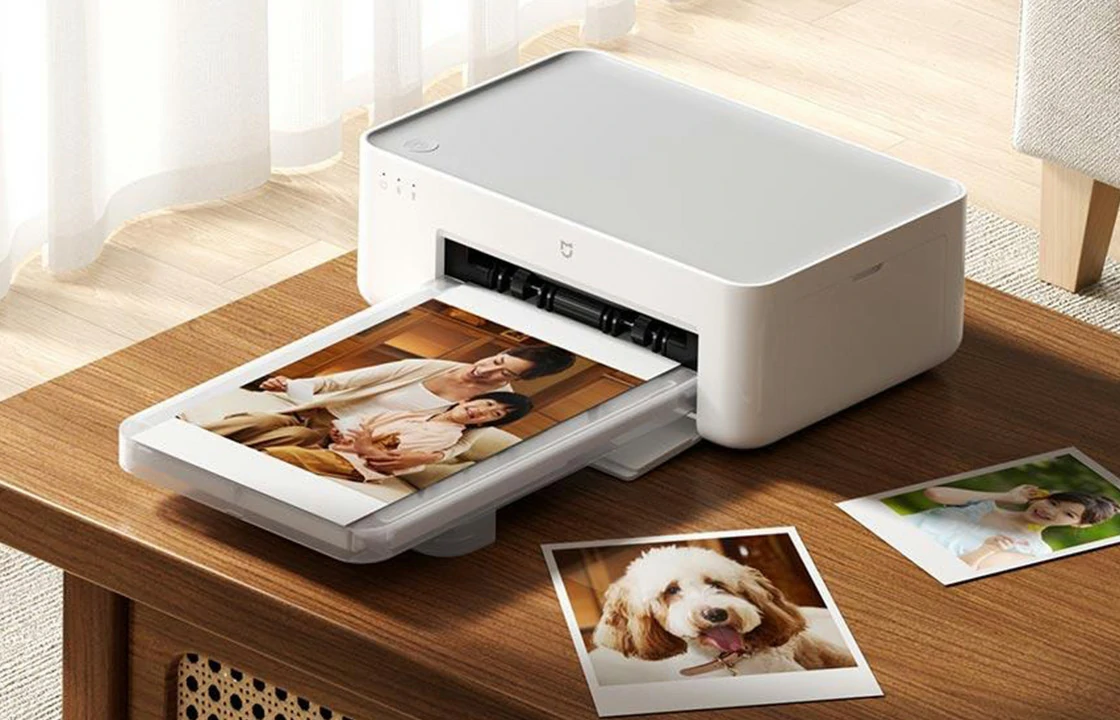
Xiaomi has introduced the Mijia Desktop Photo Printer 2 in China through its Youpin crowdfunding platform. The crowdfunding campaign is scheduled to begin on July 13.
The new model succeeds the Mijia Photo Printer 1S, originally released in 2020. Its primary hardware upgrade is the adoption of a 4-color dye sublimation printing system that adds a black (K) layer to the previous three-color process. The printer supports 4-inch dual-panel photo paper, 6-inch 4-color photo paper, square adhesive photo paper, and other compatible media sizes.
Connectivity has also changed from 2.4GHz Wi-Fi on the previous model to Bluetooth 5.2, allowing users to connect directly from a smartphone without requiring a Wi-Fi network. According to Xiaomi, multiple users can connect to the printer simultaneously.
On the software side, the Mijia Desktop Photo Printer 2 introduces LUT-based color adjustment, a smart ID photo mode, and support for AR dynamic photos. It also supports multiple textured lamination finishes, whereas the earlier model was limited to a glossy coating. Additional features include creative printing templates and automatic ID photo background replacement.
According to Xiaomi’s specifications, the printer offers a print resolution of 300 × 300 dpi, supports USB 2.0 wired connectivity, and has a paper tray capacity of 20 photo sheets. It measures 199 × 126.6 × 85.7 mm and weighs approximately 1.15 kg. Print times range from about 53 to 85 seconds per photo, depending on the selected color mode and lamination option.
Xiaomi is also offering a range of compatible consumables, including 4-inch dual-panel photo paper, 3-inch adhesive photo paper, standard 6-inch photo paper, and 6-inch 4-color professional photo paper.
Related:
- Epson Expands Seventh-Generation EcoTank Printer Line
- Xerox Launches New A4 Color Printers Following Rebranding
- Sharp Europe Launches MX-B428W A4 Monochrome MFP
- Fujifilm Expands Apeos A3 MFP Portfolio with Two New Models
- Canon Expands imageFORCE Portfolio with New A3 MFP Series
Comment:
Please leave your comment below about the news: Xiaomi Unveils Mijia Desktop Photo Printer 2.


Leave a Comment
Want to join the discussion?Feel free to contribute!